> For the complete documentation index, see [llms.txt](https://docs.finout.io/llms.txt). Markdown versions of documentation pages are available by appending `.md` to page URLs; this page is available as [Markdown](https://docs.finout.io/billing-integrations/ai-providers/connect-to-anthropic.md).
# Connect to Anthropic
## Overview
Finout's Anthropic integration ingests cost and usage data across both Anthropic surfaces — the Admin API for API platform spend, and the Enterprise Analytics API for Claude.ai spend. You connect either or both, and your Anthropic spend appears alongside your other cloud and SaaS services in MegaBill for a complete, unified view.
The two surfaces are:
* **Claude Platform** — API-based usage, models accessed via the Anthropic API.
* **Claude.ai** — chat, Claude Code, Cowork, and other claude.ai products.
With this integration, you can:
* Connect one or both Anthropic surfaces
* Connect one or more Anthropic organizations
* Include Anthropic cost and usage data in custom dashboards, set up alerts to track anomalies, and incorporate it into your financial plans to keep spending within budget
### Before you start
Each surface you connect requires its own key, generated in Anthropic:
* **Claude Platform** requires an **Admin API key**. You must have the Anthropic admin role in your organization to create one.
* **Claude.ai** requires an **Analytics API key**, available on Anthropic Enterprise plans only. You must be a Primary Owner on your Anthropic Enterprise account to create one. See Limitations below for plan and historical-data constraints.
{% hint style="info" %}
**On a Team plan?** The Claude.ai surface requires an Anthropic Enterprise plan. If you are on a Team plan, see [Tracking Claude.ai Spend](https://docs.finout.io/billing-integrations/ai-providers/connect-to-anthropic/tracking-claude.ai-spend) for a workaround.
{% endhint %}
### Step 1: Create your Anthropic keys
Create a key for each surface you plan to connect.
#### Claude Platform — Admin API key
{% hint style="success" %}
**Prerequisite:** You must have the Anthropic admin role in your organization to create an Admin API key.
{% endhint %}
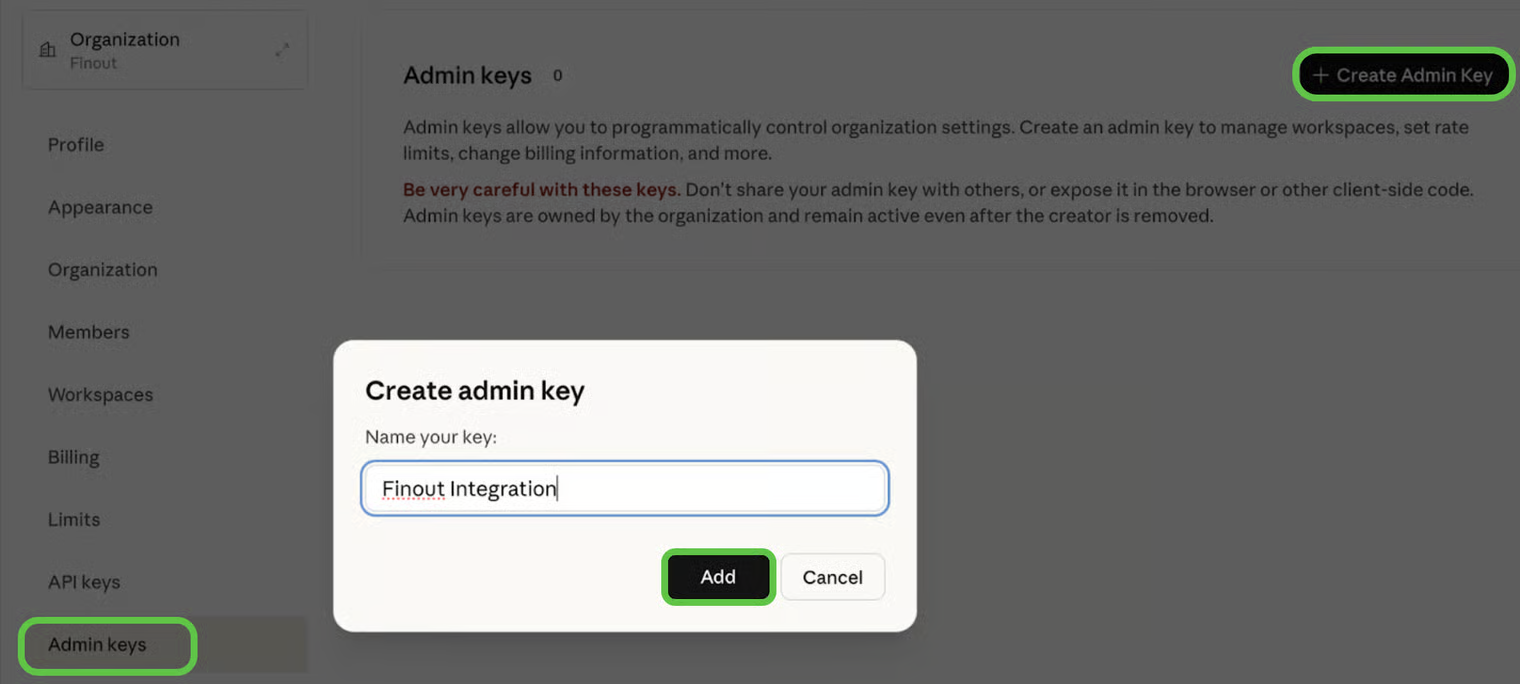
1. **Navigate** to the Anthropic Console → [Admin keys page](https://console.anthropic.com/settings/admin-keys).
2. **Click** **+ Create Admin Key**.
3. **Enter** a **Name** with a clear identifier (e.g. Finout Integration) and **click** **Add**.
4. **Copy** the key immediately and store it securely — it will not be shown again.
#### Claude.ai — Analytics API key
{% hint style="success" %}
**Prerequisite:** You must be a Primary Owner on your Anthropic Enterprise account to create an Analytics API key.
{% endhint %}
1. In Claude.ai, **navigate** to **Analytics > API keys**.
2. **Find** the **Access** toggle under **Analytics API** and turn it on.
3. **Click** **+ Create key** to generate a new key.
4. **Copy** the key immediately and store it securely — it will not be shown again.
### Step 2: Connect Anthropic to Finout
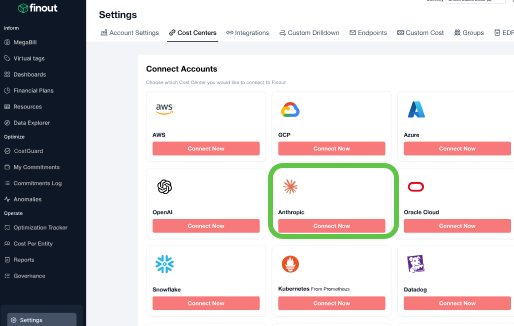
1. In Finout, **navigate** to **Settings > Cost Centers** and **click** **Add cost center**.
2. Under **Anthropic**, click **Connect Now**.
3. **Enter** the **Cost Center Name**.
4. Under **Select the Anthropic products to connect**, **select** **Claude Platform**, **Claude.ai**, or both:
1. **Claude Platform** — API-based usage, models accessed via the Anthropic API.
2. **Claude.ai** — chat, Claude Code, Cowork, and other claude.ai products.
5. **Enter** the API key for each surface you selected — your Admin API key for Claude Platform, and your Analytics API key for Claude.ai — and **click** **Next**.
#### Claude.ai limitations
* **Enterprise plans only.** The Claude.ai surface is available exclusively for Anthropic Enterprise accounts. Pro and Team plans are not supported.
* **Historical data starts January 1, 2026.** Anthropic does not expose Claude.ai usage data from earlier dates through this API.
* **Seat-based Enterprise plans:** the API only reflects spend that exceeds your included usage allotment. Usage-based Enterprise plans are covered in full.
### Understanding the Anthropic Origin dimension
When you connect both surfaces, every Anthropic data row in MegaBill carries an **Anthropic Origin** dimension, which identifies which Anthropic surface the row came from. Use this dimension to filter, group, or allocate Anthropic spend by surface.
Two values are possible:
* **Claude Platform** — applied to all rows ingested from the Admin API (`api.anthropic.com`).
* **claude.ai** — applied to all rows ingested from the Enterprise Analytics API (chat, Claude Code, Cowork, Office Agents, and Claude in Chrome).
Some Finout fields apply only to one Origin. For example, **Workspace** and **API Key** are Claude Platform concepts and appear empty on claude.ai rows; **User** and **Product** are claude.ai concepts and appear empty on Claude Platform rows. Filtering by Anthropic Origin keeps these dimensions meaningful when you build reports that focus on one surface.
## FAQs
**Does Finout keep track of historical changes to the Anthropic Workspace name?** Finout does not automatically track historical changes to Anthropic Workspace names; rather, it identifies Workspaces by their Workspace ID, which is unique and immutable. Workspace names are displayed based on the **current value available when data is ingested or when a historical run is executed**. As a result, when a Workspace name changes, Finout shows the new name from that point forward. Existing historical data is **not automatically updated**.
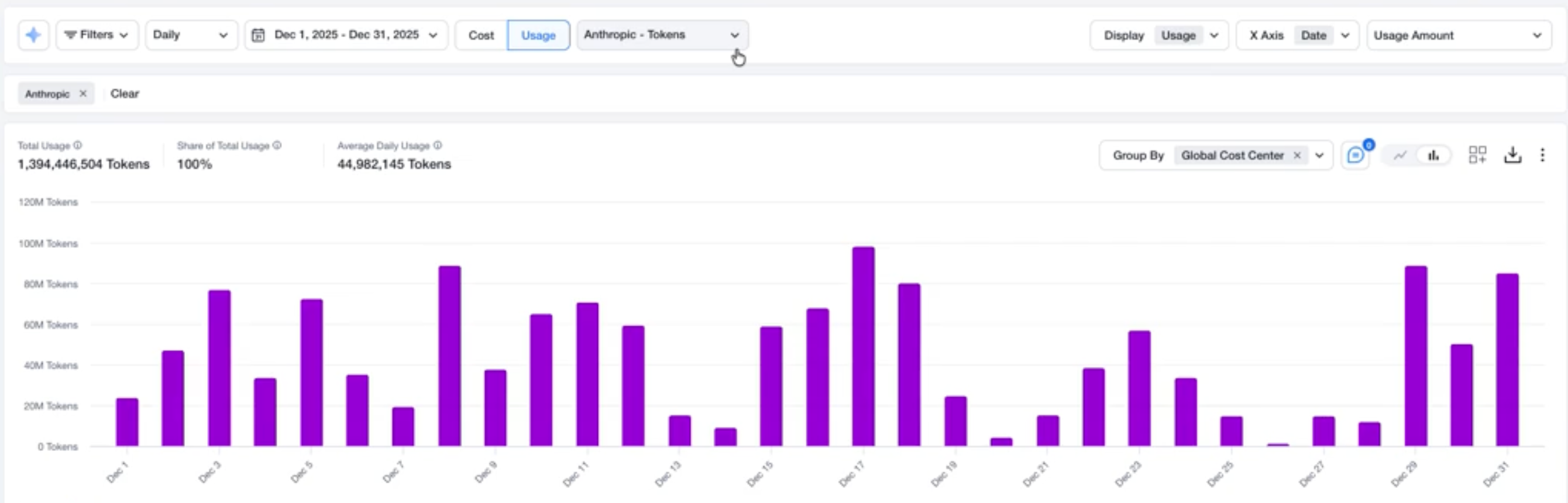
**Is usage data available for Anthropic?**
Yes, usage data for Anthropic is available in Finout. To view it, go to Usage, apply Filters as needed, and use Group By to break down Anthropic usage data . This allows you to analyze usage alongside cost for deeper visibility into consumption patterns.
---
# Agent Instructions
This documentation is published with GitBook. GitBook is the documentation platform designed so that both humans and AI agents can read, navigate, and reason over technical content effectively. Learn more at gitbook.com.
## Querying This Documentation
If you need additional information that is not directly available in this page, you can query the documentation by asking a question.
Perform an HTTP GET request on the following URL with the `ask` and `goal` query parameters:
```
GET https://docs.finout.io/billing-integrations/ai-providers/connect-to-anthropic.md?ask=&goal=
```
`ask` is the immediate question: it should be specific, self-contained, and written in natural language.
`goal` is what the user is ultimately trying to achieve, the reason they need the answer. Sharing it helps GitBook give you a better, more relevant answer. A goal is most helpful when it describes the outcome the user wants rather than restating the question. For example, with `ask=how do I create an API token`, a goal like `automate deployments from our CI pipeline` lets GitBook tailor the answer to that use case.
The response will contain a direct answer to the question and relevant excerpts and sources from the documentation.
Use this mechanism when the answer is not explicitly present in the current page, you need clarification or additional context, or you want to retrieve related documentation sections.