> For the complete documentation index, see [llms.txt](https://docs.finout.io/llms.txt). Markdown versions of documentation pages are available by appending `.md` to page URLs; this page is available as [Markdown](https://docs.finout.io/kubernetes-integrations/kubernetes/kubernetes-across-finout.md).
# Kubernetes Across Finout
## Overview
Finout’s Kubernetes enrichment enables deep, consistent visibility into Kubernetes costs across your platform. By incorporating native Kubernetes dimensions like namespaces, labels, and resource types throughout Finout, you can analyze, track, and optimize cloud spend for Kubernetes workloads across all platform features.
Whether tagging resources, building dashboards, exploring data, or setting alerts, the Kubernetes enrichment allows you to group, filter, and report Kubernetes costs in ways that align with your engineering structure. This makes it easier for FinOps, DevOps, and engineering teams to collaborate, optimize usage, and drive accountability across clusters.
## Using Kubernetes in Finout
Here is a list of where you can use the Kubernetes data in Finout:
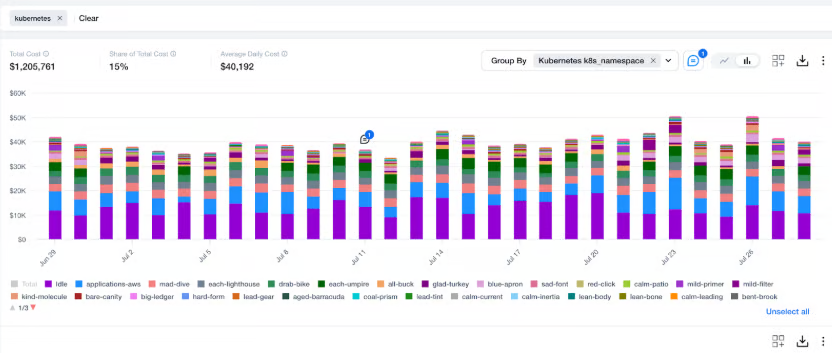
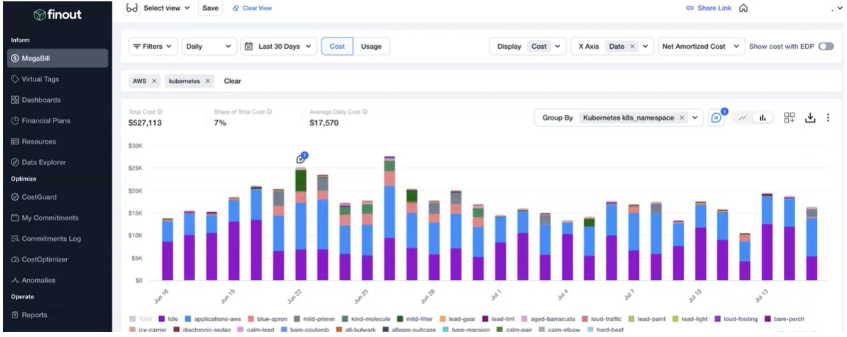
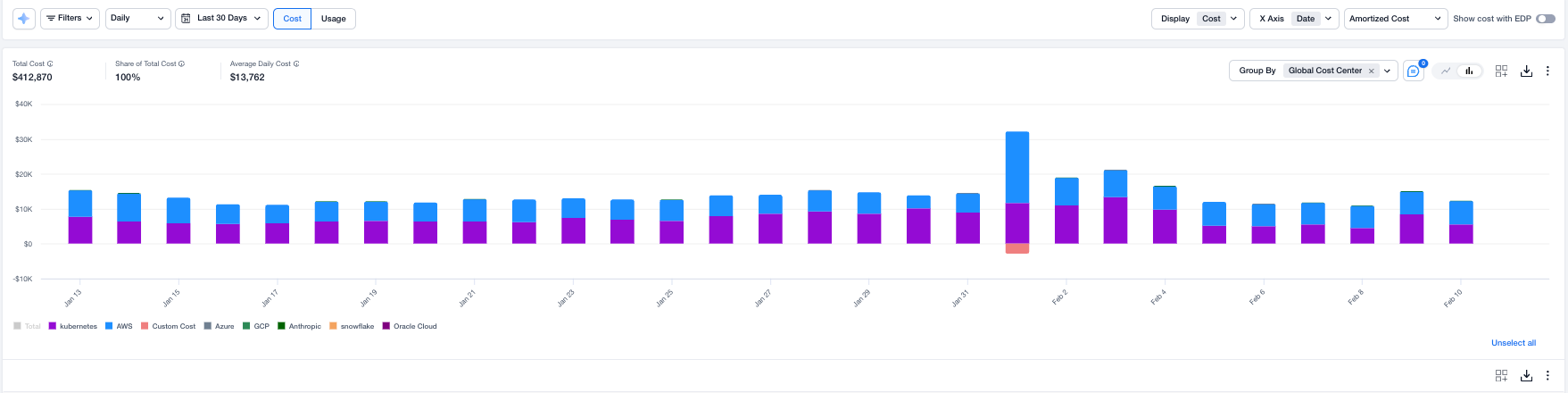
* [**MegaBill**](/user-guide/inform/megabill.md): The Kubernetes enrichment in Finout's MegaBill provides cost and usage visibility across your Kubernetes environment. By grouping and filtering by native attributes like namespaces, labels, and resource types, users can track spend trends, spot inefficiencies, and connect usage changes to cost impacts, supporting better optimization and budgeting over time.team's\
\
*Example*: \
Filter on Kubernetes cost center and group by namespace to break down costs per application. This not only helps you see which namespaces are driving the highest costs and allocate expenses accurately across projects or departments, but also makes it easy to spot idle namespaces that can be rightsized for greater efficiency, using the dedicated ‘idle’ namespace created by [Finout’s Kubernetes cost calculation algorithm](/kubernetes-integrations/kubernetes/how-finout-calculates-kubernetes-costs.md).
See [below ](#filtering-and-grouping-kubernetes-enrichment)for a different example.
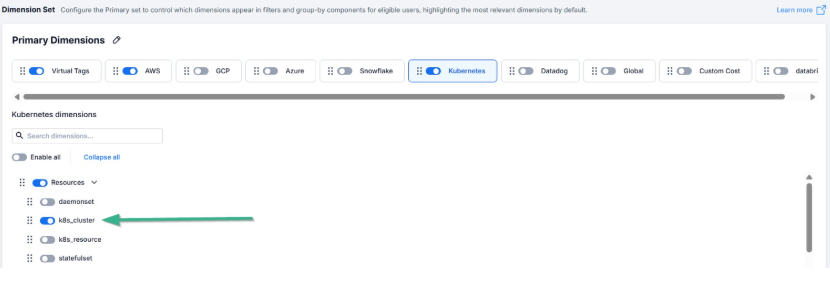
* [**Dimension Sets** ](/settings/dimension-sets.md)- Select the relevant Kubernetes dimensions for streamlined filtering and grouping within the set’s context.
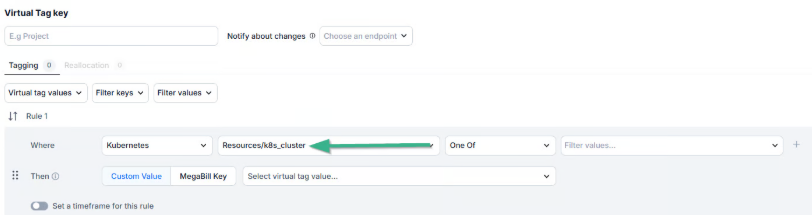
* [**Create Virtual Tags**](/user-guide/inform/virtual-tags.md) -Use Kubernetes Dimensions like namespaces or labels to auto-tag workloads by team, project, or environment, which can also be used for shared cost reallocation.
* [**Creating Custom Dashboards (Widgets)**](/user-guide/inform/finops-dashboards/custom-dashboards.md) -Build dashboards filtered and grouped using Kubernetes dimensions to monitor workload costs and usage in real time.
Note: This is relevant for all widgets except for CostGuard.
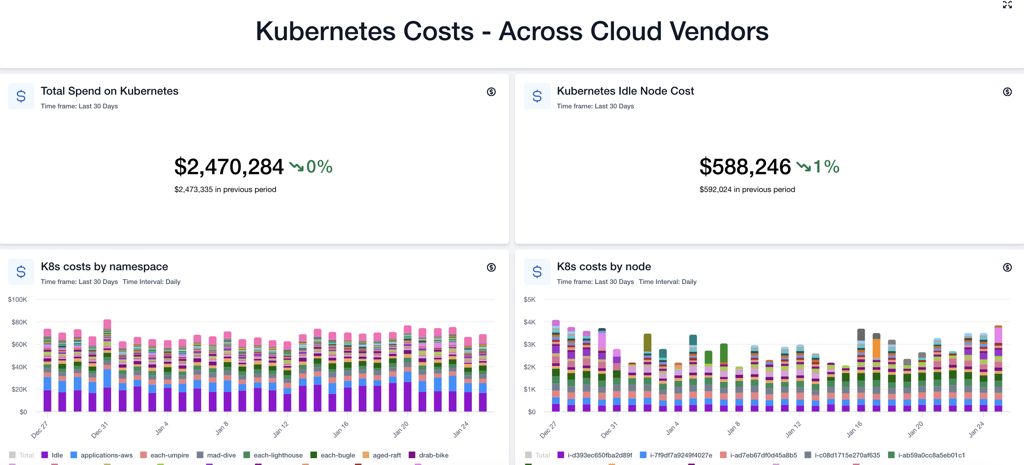
* [**Predefined Dashboards**](/user-guide/inform/finops-dashboards/predefined-dashboards.md) - The Kubernetes predefined dashboard in Finout offers Kubernetes costs visualizations based on key dimensions, such as cluster, node, namespace, and workload. This dashboard helps you to quickly identify top spending workloads, idle node costs at different levels, and understand your Kubernetes spend across Cloud vendors based on the enabled enrichment integrations in your account through clear, actionable charts with no setup required.
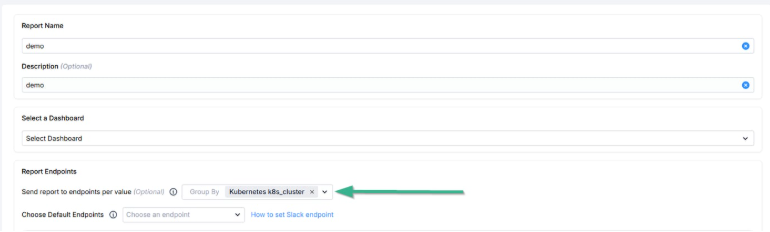
* [**Reports** ](/user-guide/operate/reports.md)- Generate reports for related Kubernetes dashboards to share your dashboards' cost and usage summaries.
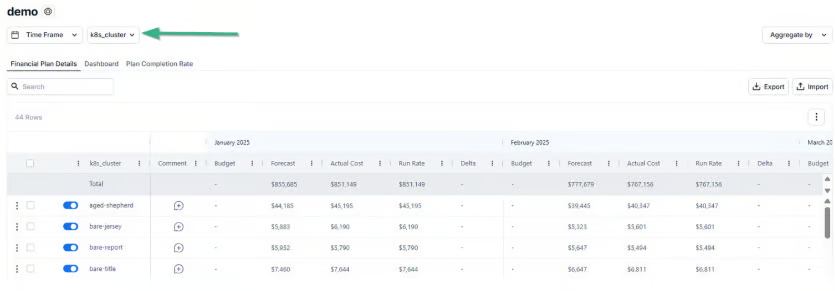
* [**Financial Plans**](/user-guide/inform/financial-plans.md) -Plan budgets based on Kubernetes cost usage trends across clusters, namespaces, or workloads related to the CSP infrastructure that Kubernetes is using.
* [**CostGuard Scans**](/user-guide/optimize/costguard/finout-scans.md) - Identify inefficiencies and optimize costs of Kubernetes environments using Kubernetes right-sizing scans.
\
As part of [Kubernetes rightsizing](/user-guide/optimize/costguard/finout-scans.md#h_72d396e03d), when a user clicks on a resource that can be optimized, they can use Finout's dynamic calculator to simulate CPU and Memory values per node. The calculator proposes recommended requests based on the percentile usage of your samples, and shows minimum, maximum, and average usage, allowing you to understand how the potentially applied changes will affect the optimized cost.
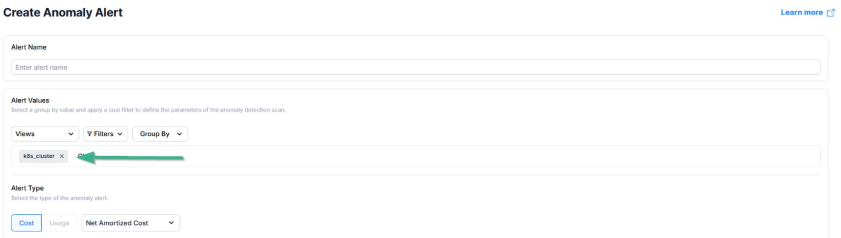
* [**Anomaly Alert**](/user-guide/optimize/anomalies.md) -Set alerts for unusual Kubernetes usage or cost spikes based on historical behavior.
* **Cost per Entity** -Break down cost per Kubernetes entity (e.g., namespace or workload) for showback or chargeback.
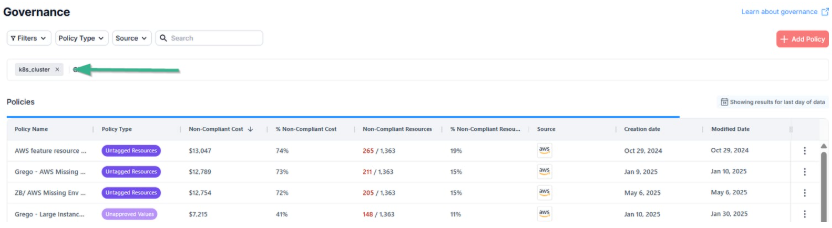
* [**Governance** ](/user-guide/operate/tag-governance.md)- Track tagging coverage and compliance for Kubernetes resources across your organization.
* [**Data Explorer**](/user-guide/inform/data-explorer.md) - Explore Kubernetes data by workload, namespace, or label to uncover trends and outliers.
* **Resources View** - Drill down into individual Kubernetes resources to analyze cost and usage.
## Filtering and Grouping Kubernetes Enrichment
Utilize Finout’s filtering and Group By features to break down and analyze Kubernetes costs by dimensions such as namespaces, pods, workloads, and node and pod labels. In MegaBill, you can combine these Kubernetes dimensions with every cost center and virtual tags, giving you a clear, flexible view of your costs across the entire environment. This enables cost optimization, team-based spending tracking, and strategic decision-making for your Kubernetes environment.
**Example Scenario: Identifying Teams with High Kubernetes Idle Costs**
To identify which teams are driving high Kubernetes idle costs and determine which environments may require rightsizing optimization, follow this targeted analysis workflow. By systematically filtering and grouping your data, you can quickly pinpoint optimization opportunities:
1. **Filter** Kubernetes data for AWS or any other cost center whose infrastructure Kubernetes uses in your account.
2. **Group by** the K8s dimension " k8s\_namespace".
3. [**Filter** ](/kubernetes-integrations/kubernetes/how-finout-calculates-kubernetes-costs.md)for idle namespace, which represents idle node costs.
4. Change **Group by** to "teams" virtual tag.
Note: This can be done only if the teams virtual tag isn't using reallocation, and it can also be applied to any other virtual tag in your account.
This workflow helps identify teams with idle resources that could benefit from environment optimization and pinpoint teams that aren't fulfilling the full potential of their Kubernetes-related resource requests versus actual usage—enabling these teams to rightsize resources for cost optimization.
{% embed url="" %}
**Example Scenario: Identifying Engineering Teams that can Optimize their Kubernetes Infrastructure**
Finout enables you to analyze Kubernetes costs by resource utilization, helping you identify resources that can be optimized.
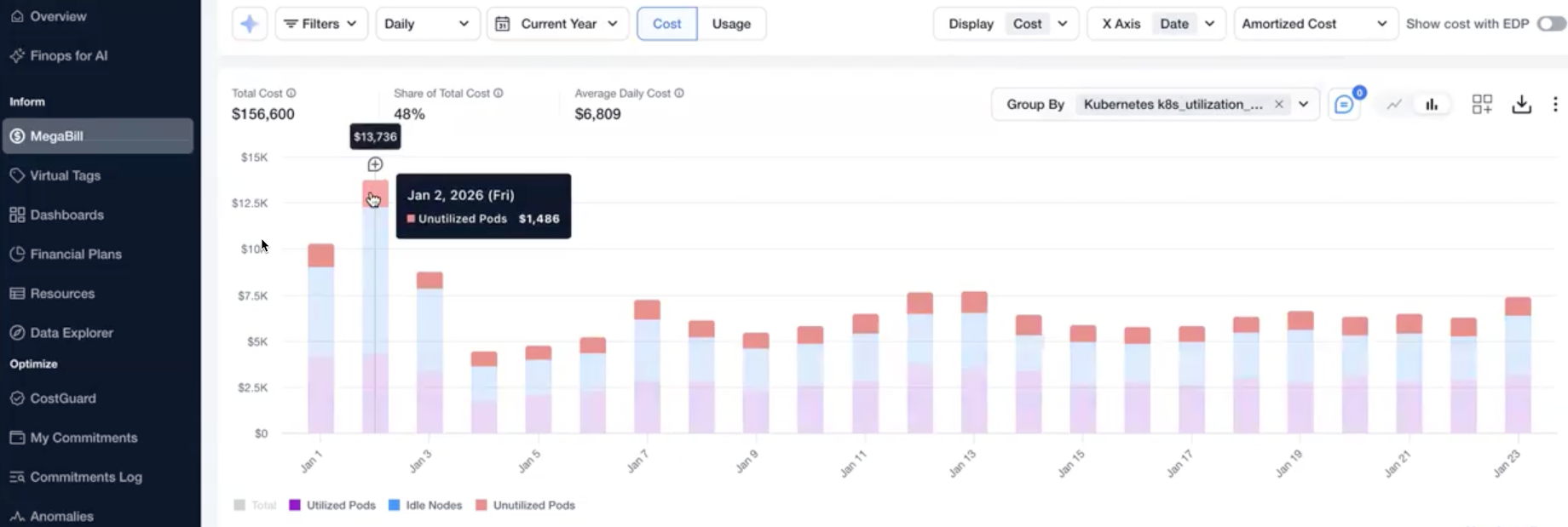
Kubernetes costs in Finout are broken down into three utilization types, using the **Kubernetes Utilization Type** dimension:
* **Idle Nodes** – Node-level capacity that is not allocated to any pod, representing infrastructure-level idle capacity.
* **Utilized Pods** – Pod resources that are both requested and actively used, based on CPU or memory usage metrics.
* **Unutilized Pods** (limited release) – Pod resources that are requested but not used, reflecting over-provisioned workloads.
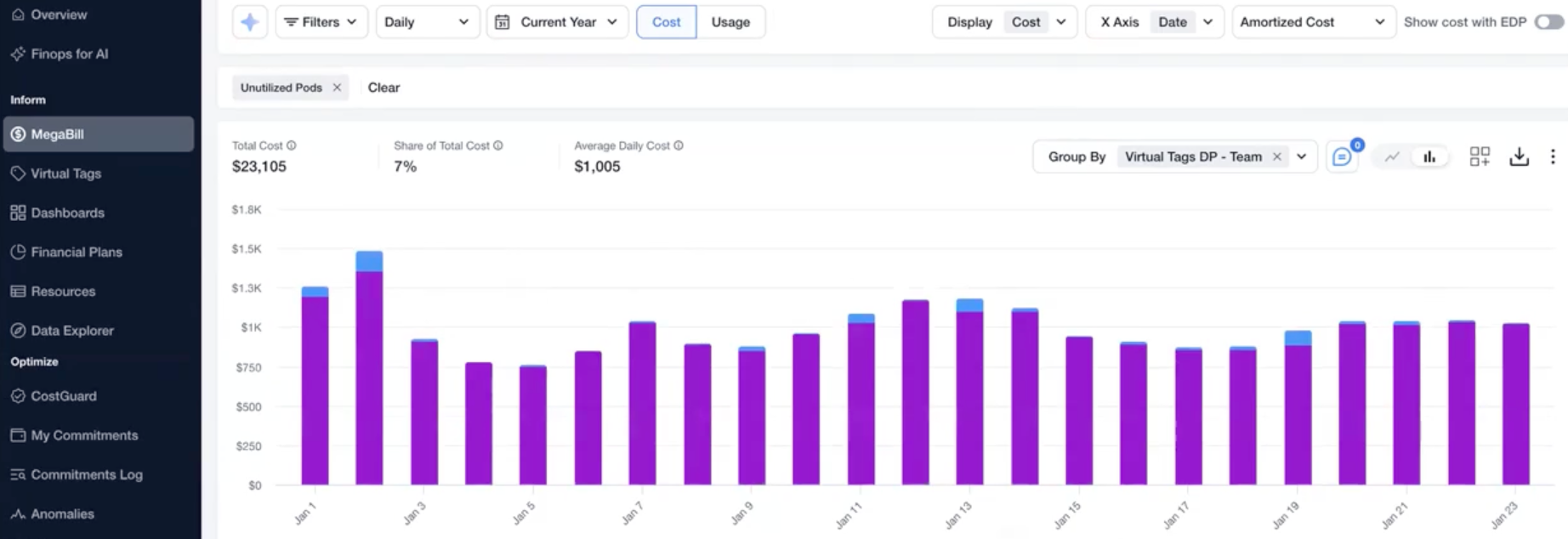
Group by **Kubernetes Utilization Type** (limited release) and team to find workloads that regularly request more CPU or memory than they use. High unutilized workload cost flags over-provisioned requests and guides engineering teams for rightsizing.
{% hint style="warning" %}
This feature is under a **limited release** and isn't enabled by default. To enable it, contact Finout support at .\
**Note**: This feature is automatically available for all accounts created starting mid-February 2026.
{% endhint %}
1. **Group By**: Group by the Kubernetes dimension "k8s\_utilization\_type".
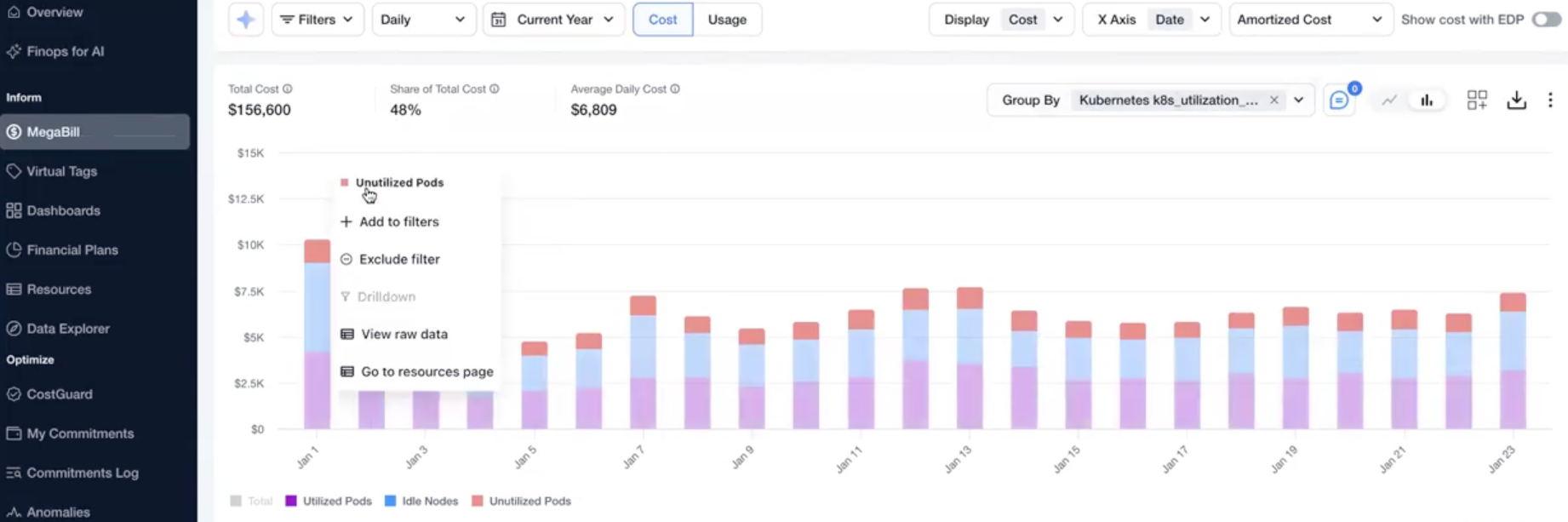
2. **Add Filter**: Filter by Unutilized Pods.
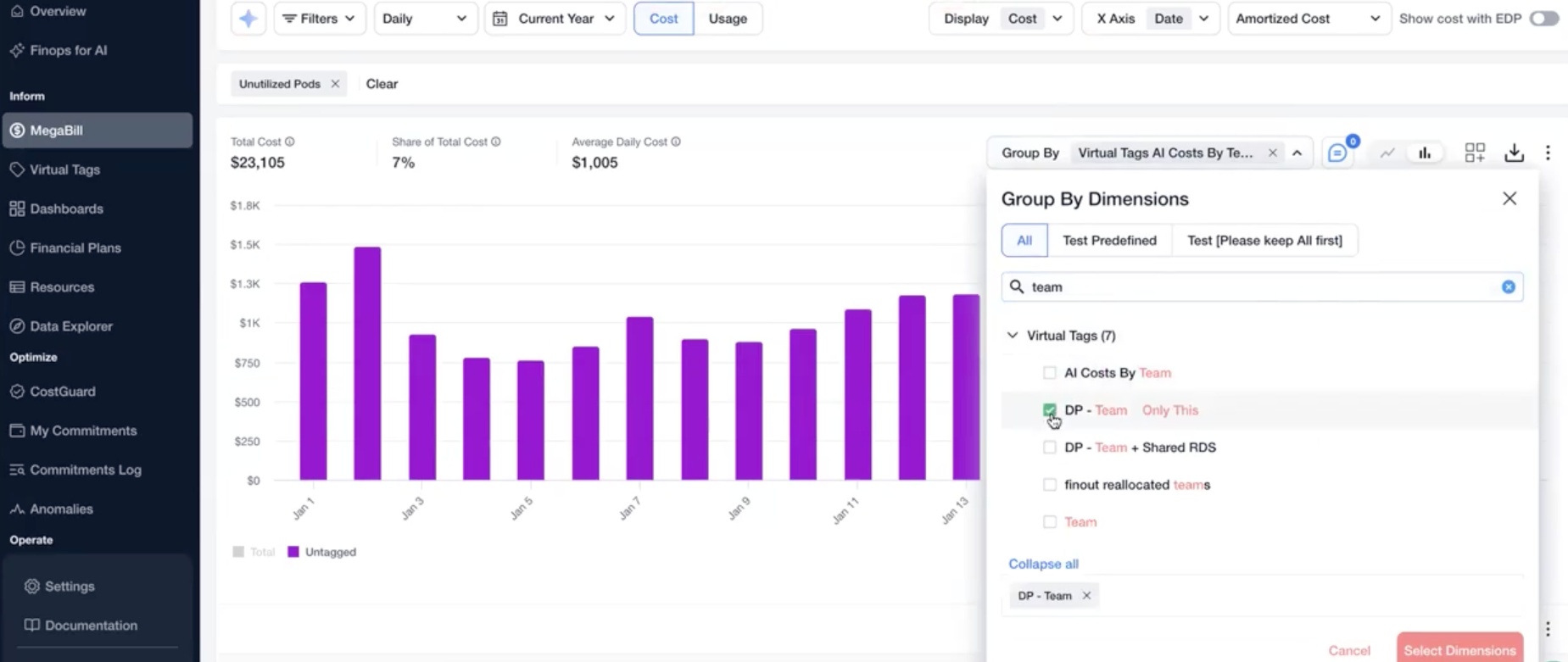
3. Change the **Group by** to "teams" Virtual Tag.
**Result:** You identified engineering teams that can optimize their Kubernetes infrastructure by rightsizing their workloads. See [CostGuard](/user-guide/optimize/costguard/finout-scans.md#h_72d396e03d) for more details.
**Example Scenario: Filtering Kubernetes Costs Running On A Specific Cloud Provider**
{% hint style="info" %}
**Note**: This scenario applies to any cloud provider that supports Kubernetes enrichment in Finout (AWS, GCP, or Azure).
This example uses AWS, but you can use the same steps for other supported cloud providers.
{% endhint %}
To view the costs of Kubernetes running on a specific cloud provider infrastructure:
1. Open the MegaBill.
2. Open **Filters** and select the **K8s Origin** dimension.
3. Choose the relevant cloud provider (amazon-cur, for example) and click **Apply Filters**.\
This filters Kubernetes costs that run specifically on the selected cloud provider’s infrastructure.
This workflow helps identify the costs of running Kubernetes on a specific cloud provider’s infrastructure, enabling you to analyze Kubernetes spend in the selected cloud's context while maintaining the total cloud costs.
---
# Agent Instructions
This documentation is published with GitBook. GitBook is the documentation platform designed so that both humans and AI agents can read, navigate, and reason over technical content effectively. Learn more at gitbook.com.
## Querying This Documentation
If you need additional information that is not directly available in this page, you can query the documentation by asking a question.
Perform an HTTP GET request on the following URL with the `ask` and `goal` query parameters:
```
GET https://docs.finout.io/kubernetes-integrations/kubernetes/kubernetes-across-finout.md?ask=&goal=
```
`ask` is the immediate question: it should be specific, self-contained, and written in natural language.
`goal` is what the user is ultimately trying to achieve, the reason they need the answer. Sharing it helps GitBook give you a better, more relevant answer. A goal is most helpful when it describes the outcome the user wants rather than restating the question. For example, with `ask=how do I create an API token`, a goal like `automate deployments from our CI pipeline` lets GitBook tailor the answer to that use case.
The response will contain a direct answer to the question and relevant excerpts and sources from the documentation.
Use this mechanism when the answer is not explicitly present in the current page, you need clarification or additional context, or you want to retrieve related documentation sections.