# Edit Group Users and SAML Groups

Finout provides flexibility in managing group members. Whether you're creating a new group or updating an existing one, you can easily add or remove users and SAML groups.

#### **Add or remove a user from a group:**

1. Log in to Finout as an **Admin** user.
2. Navigate to **Settings**.
3. Select the **Groups** tab.
4. Click on (⋮) and select **Edit Group**.
5. Navigate to the **Users & SAML Mapping** tab.
6. To add users to the group, select the new users from the drop-down under **Select group member**.
7. To remove a member from this group, click on (⋮) and select **Remove user**.

#### **Add or remove SAML mapping:**

1. In the **Users and SAML mapping** tab, use the free text option to input the desired SAML mapping and click + ADD.
2. The added SAML group will be displayed in a table under the **SAML group** tab.&#x20;

   <div data-gb-custom-block data-tag="hint" data-style="info" class="hint hint-info"><p><strong>Note</strong>: A numeric indication next to the group name indicates the number of groups added.</p></div>
3. To add more SAML groups, simply repeat step 5 for each group.
4. To remove a SAMK mapping group, click the three dots and select **Remove SAML group**.

#### **Edit group settings:**

1. Log in to Finout as an **Admin** user.
2. Navigate to **Settings**.
3. Select the **Groups** tab.
4. Click on (⋮) and select **Edit Group**.
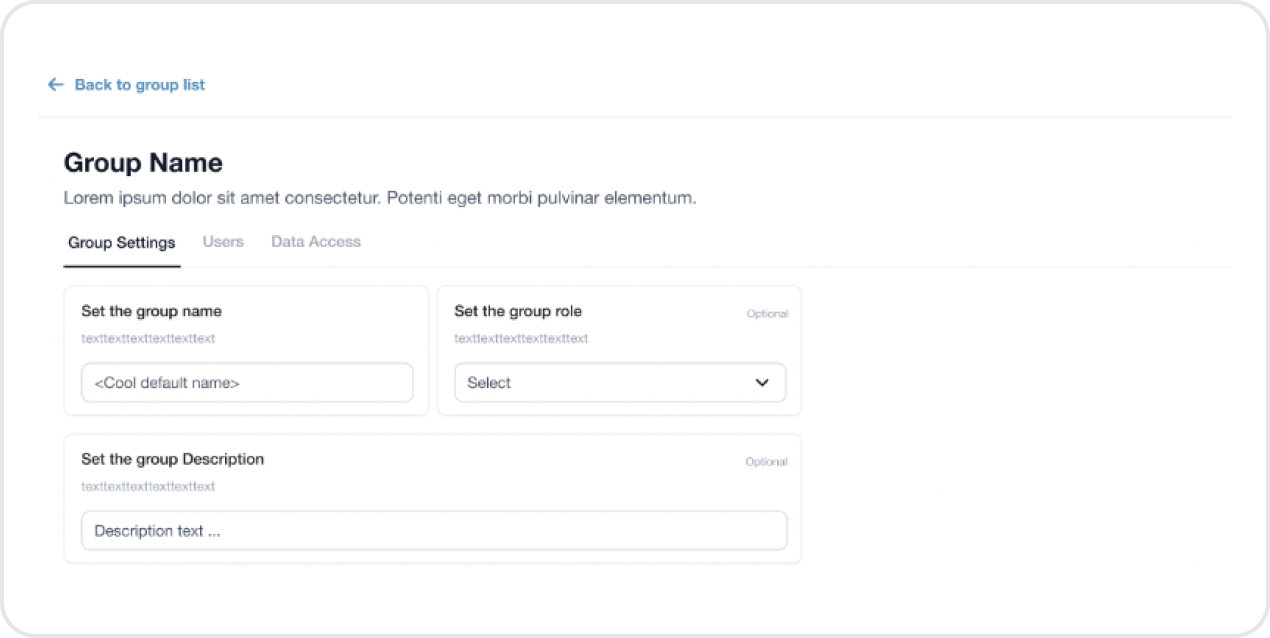
5. Select the **Group settings** tab.
6. In the **Group settings**, you have the option to edit the group name, role, and description.<br>

   <div align="left"><figure><img src="https://3858159242-files.gitbook.io/~/files/v0/b/gitbook-x-prod.appspot.com/o/spaces%2FWqjB2puKXPDR7L86FX2e%2Fuploads%2FA7OAYT8NJasfDzsub27n%2Fimage.png?alt=media&#x26;token=7d521051-d242-4675-8163-cbe175a9077b" alt=""><figcaption></figcaption></figure></div>

#### **Configure Okta to sent the group attribute:**

\
Configure the profile claims and Group Attribute Statements.<br>

<figure><img src="https://3858159242-files.gitbook.io/~/files/v0/b/gitbook-x-prod.appspot.com/o/spaces%2FWqjB2puKXPDR7L86FX2e%2Fuploads%2FVBkVpUfRwZYXpWfpule0%2Fimage.png?alt=media&#x26;token=663457f2-ae0e-4754-adc6-16478020ed36" alt=""><figcaption></figcaption></figure>