> For the complete documentation index, see [llms.txt](https://docs.finout.io/llms.txt). Markdown versions of documentation pages are available by appending `.md` to page URLs; this page is available as [Markdown](https://docs.finout.io/user-guide/optimize/costguard/cloud-native-scans/aws-scans.md).
# AWS Scans
Finout continuously retrieves AWS optimization recommendations directly from your AWS environment and surfaces them in CostGuard once onboarding is complete. These AWS scans are automatically enriched with billing and data, giving you deeper visibility into each resource’s tags, metadata, and usage context.
This enrichment helps you better understand the impact and priority of each recommendation, making it easy to filter, analyze, and act on them directly within CostGuard and CostGuard widgets.
The following sections describe and list the idle and rightsizing AWS scans that are available in CostGuard.
{% hint style="success" %}
**Prerequisite:**
* To connect AWS recommendations for a cost center that is already onboarded to your Finout account, contact Finout Support for assistance.
* To connect AWS recommendations for a new cost center, click [here](/billing-integrations/cloud-providers/connect-to-aws.md#h_9785239bf6-1) to complete the onboarding flow.
{% endhint %}
***
### Idle
Almost every organization has resources that were provisioned but are no longer in use. Forgetting to switch off these **Idle** resources eats away at your tech budget.
See the complete list of AWS Idle Scans:
{% file src="/files/BtNe4gFjAqN6COlJjuad" %}
***
### Rightsizing
Resources in use may be underutilized, exceeding your current workload performance and capacity requirements. **Rightsizing** means you can downsize these resources without compromising your service levels.
See the complete list of AWS Rightsizing Scans:
{% file src="/files/kwgTIyPC8JO4R3Fw9bmu" %}
***
### Commitment
Many cloud providers offer significant discounts on resource costs in exchange for a long-term usage commitment. Failing to leverage these commitment options (like Reserved Instances or Savings Plans) means you are paying full price unnecessarily. Commitment scans help you analyze your usage patterns to identify the optimal reservations to purchase and maximize savings.
See the complete list of AWS Commitment Scans:
{% file src="/files/REXYfTPhxsrAlv1J93Zj" %}
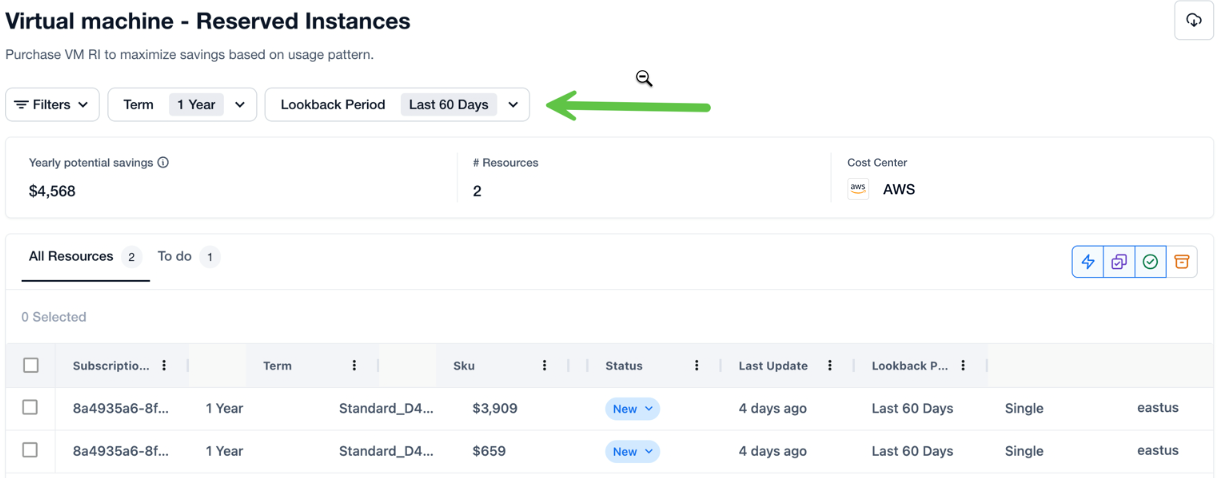
#### AWS Commitment Scan Filters
Finout displays recommendations for Savings Plans and Reserved Instance (RI) commitment scans arrive from AWS, allowing you to simulate and view potential savings accurately. Because AWS evaluates these savings differently based on historical usage and the commitment length, a single resource may have multiple valid recommendations.\
The following filters let you view only the specific recommendation set that matches your chosen criteria, dynamically updating both the list of commitments and the total potential savings.
* **Lookback Period**: This determines how much historical data is analyzed to create the recommendation. You can choose between:
* Last 7 Days: Best for capturing very recent usage spikes or changes.
* Last 30 Days: The standard baseline for most workloads.
* Last 60 Days: (The Default) Provides a broader view of usage patterns over two months.
* **Commitment Term**: This defines the duration of the agreement you are considering. Options include:
* 1 Year: (The Default) Offers lower risk with significant savings over on-demand rates.
* 3 Years: Maximizes your discount for steady, long-term workloads.
{% hint style="info" %}
**Note**: When you adjust the Lookback Period or Term, the table refreshes immediately to show only the recommendations that match that specific combination.
{% endhint %}
## FAQs
#### **What are AWS scans in CostGuard?**
AWS scans are native AWS optimization recommendations that Finout retrieves directly from your AWS environment after onboarding. These recommendations surface in CostGuard and help you identify idle resources, and rightsizing opportunities.
#### **Are commitment-based optimization scans available in AWS scans?**
Not yet. Finout’s AWS scans currently cover idle and rightsizing recommendations enriched with your billing data and resource context. Commitment-based optimization scans are planned and will be coming soon.
---
# Agent Instructions
This documentation is published with GitBook. GitBook is the documentation platform designed so that both humans and AI agents can read, navigate, and reason over technical content effectively. Learn more at gitbook.com.
## Querying This Documentation
If you need additional information that is not directly available in this page, you can query the documentation by asking a question.
Perform an HTTP GET request on the following URL with the `ask` and `goal` query parameters:
```
GET https://docs.finout.io/user-guide/optimize/costguard/cloud-native-scans/aws-scans.md?ask=&goal=
```
`ask` is the immediate question: it should be specific, self-contained, and written in natural language.
`goal` is what the user is ultimately trying to achieve, the reason they need the answer. Sharing it helps GitBook give you a better, more relevant answer. A goal is most helpful when it describes the outcome the user wants rather than restating the question. For example, with `ask=how do I create an API token`, a goal like `automate deployments from our CI pipeline` lets GitBook tailor the answer to that use case.
The response will contain a direct answer to the question and relevant excerpts and sources from the documentation.
Use this mechanism when the answer is not explicitly present in the current page, you need clarification or additional context, or you want to retrieve related documentation sections.